3DLoadCalculator 2.0: PackSearch, manual editing and loading instructions for the dock
The biggest update since 3DLoadCalculator launched. A new planning engine that searches thousands of arrangements, a 3D edit mode where you move cargo yourself, step-by-step loading instructions, and new pricing.
Planning a load does not stop at the first calculation. You look for an arrangement that fits more cargo, adjust the plan to suit the dock, and hand it to the people who load the container. 3DLoadCalculator 2.0 makes each of those steps easier.
It is the biggest update since 3DLoadCalculator launched. It introduces PackSearch, a new planning engine that searches thousands of alternative arrangements to use more of every container. It also brings a manual edit mode where you move and rotate cargo in 3D, with undo; step-by-step loading instructions you can print or export; a rebuilt cargo spreadsheet and Excel import; cylinder and drum loading; group loading rules; and free view-only team members.
Everything you used before still works the way you know it. 2.0 is the same container load planning software, and it does a great deal more. With the release comes new pricing, explained further down with exactly what applies to your account.

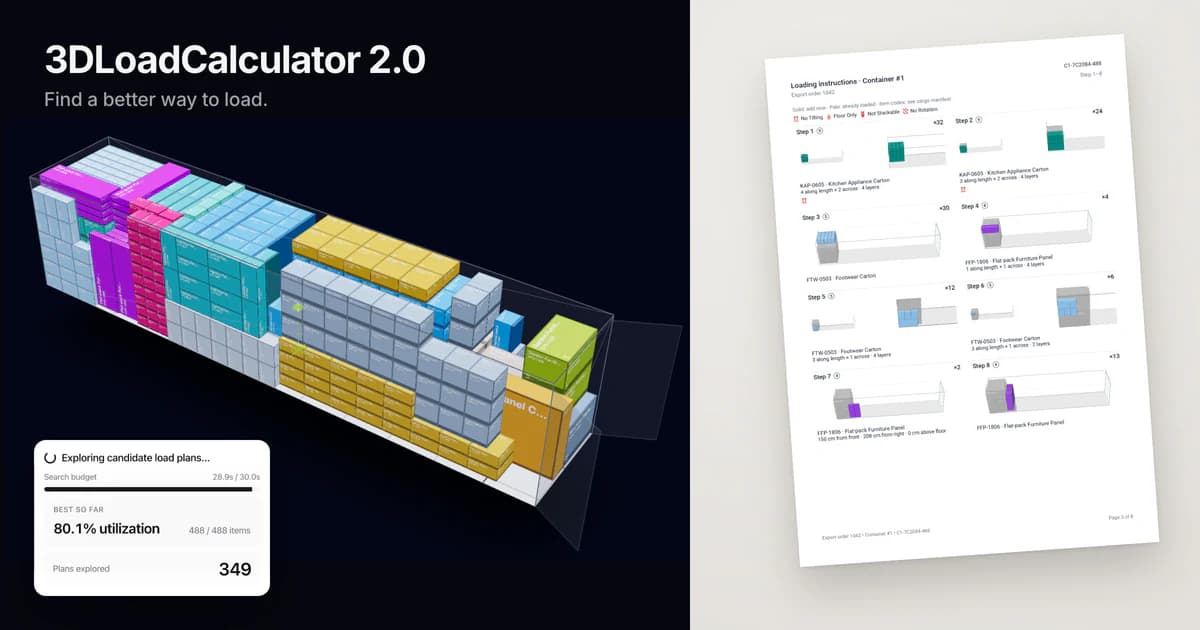
The plan PackSearch saved for this shipment: all 488 pieces in one 40 ft high-cube, 80.1% of its volume.
Three things to try first in 2.0
1. PackSearch: a better plan for the same cargo
Getting more cargo into the container is what PackSearch is for. It is the new default planning engine, labeled Recommended. It explores alternative arrangements of your cargo and keeps the best one it finds.
You can also watch it work. While it runs, a progress panel shows what it is doing, how much of its search time it has used, and a live Plans explored counter. Best so far shows how much of the container is used and how many items are placed, and it lights up each time PackSearch finds a better arrangement. With several containers, you see each one as soon as its plan is ready.
How long it searches is up to you: choose Fast, Balanced (the default) or Thorough under Calculation time. More time allows more exploration but does not guarantee an improvement on every run.
Open a project you have already planned, switch the planning method to PackSearch, run Auto Plan, and compare the space used before and after. The numbers come from your own shipment, not from us.

Mid-run on a 40 ft high-cube with Balanced timing: 148 plans explored. The first arrangement used 69.1% of the container and left 11 items out; PackSearch has just found one that loads all 488 and uses 80.1%.
Requires: trial, subscription or day ticket.
2. Manual load plan editing: move the cargo yourself
Sometimes the plan is close, but the dock wants the fragile goods by the door or one crate turned the other way. Instead of rerunning the planner, you can now make that change yourself with a manual edit mode in the 3D view.
Choose Edit layout, then click an item to pick it up: it follows the pointer, resting on the floor or on the cargo below, until a click places it. Right-click or press R to rotate it. To undo or redo, use Ctrl+Z and Shift+Ctrl+Z (Cmd on a Mac) or the Undo and Redo buttons. Keyboard hints and an edit-mode indicator show what you can do.
Manual mode relaxes cargo restrictions, so you can arrange the load the way the dock needs it. The app also protects your work: it shows when you have unsaved changes, asks before you leave without saving, and confirms "Plan saved". Auto Plan asks before it replaces your manual edits. Finish the plan the way it will actually be loaded, then export it.

Requires: trial, subscription or day ticket.
3. Loading instructions for the dock, and a plan link you can send to anyone
Once the plan is final, the dock needs a loading sequence it can print. The new Loading instructions report lays it out step by step, as a PDF or a printout. The export dialog is simpler now: choose Save PDF or Print Manifest in the 3D view, then check Loading instructions to add the sequence.
To show the plan to a customer or a warehouse, send a link. The new Share plan dialog creates a public plan view that opens without an account, so you do not have to set one up for them. The PDF, the share link and the 3D view all reflect the same saved plan. Plan the load once, print the sequence for the forklift driver, and send the link to the customer.

Requires: exporting and sharing work on the trial, with a subscription, or with a day ticket. After the free plan ends on 30 November 2026, free accounts can still open share links and export PDFs of existing plans, but editing needs a subscription or a day ticket.
Getting the most out of PackSearch
Clean the cargo list first. Correct dimensions, weights and quantities matter more than any setting; the rebuilt spreadsheet flags invalid rows before you calculate.
Set constraints honestly. Marking everything "not stackable" guarantees a half-empty container. Use Place on floor for cargo that must sit on the floor. PackSearch does not use maximum stack weight or maximum layers; if a cargo item has one set, the selector says so and you can clear it or choose another method.
Start on Balanced; switch to Thorough for the final plan when the container is close to full. Compare runs by space used and items placed, not by time spent.
Use groups for multi-stop loads. Keep group order is the difference between a plan the dock can follow and one they will rearrange. No stacking between groups keeps one customer's cargo off another's.
Turn on balanced weight distribution for road and rail, then read the center-of-gravity warnings on the finished plan. It is a preference, not a guarantee.
Finish by hand if needed. In the 3D view, choose Edit layout, move or rotate the last items, then export the loading instructions.
Everything else in the 2.0 release
Everything below is live. The full list is in the release notes at the end of this page.
PackSearch planning engine. Group loading rules (Mix groups, Keep group order, No stacking between groups, Separate loading zones), Load in list order, a Place on floor constraint, and Prefer balanced weight distribution as a preference. Unstackable items go on top, large items are centered, and multi-container planning checks items against future containers. Not supported: palletized cargo, and cargo with a maximum stack weight or maximum layers set; the method selector names the reason and blocks the calculation.
Cylinder and drum loading. Drums and other cylinders load in nested patterns, with rows aligned to the container walls, next to your boxes in the same plan.

Working with the finished plan. Move cargo between containers with a searchable Unloaded cargo panel. Add or remove containers inside an existing plan, or repack a single container. Doorway warnings, center-of-gravity height warnings, gross/tare payload, door dimension checks, stale-plan detection, redesigned overview cards.
Loading instructions, reports and sharing. New PDF and print reports including Loading instructions. Arabic, Hindi, Thai and CJK scripts (Chinese, Japanese, Korean) in PDFs. New share modal and a public plan view that opens without an account.
Cargo spreadsheet and import. Row-level validation, dirty-state tracking and batch saving. Constraint columns as icons, advanced columns you can hide. Improved import template and dialog, with import by total weight. Fixed: double scrolling and precision loss on decimal dimensions.
Equipment and cargo libraries. Redesigned equipment and item editors with a quantity selector, door dimensions and gross/tare payload. Custom colors by hex value. Door size cannot exceed container dimensions.
Teams, account and app. Team members join free with view-only access; the owner assigns seats (editing licenses) and day tickets. Invites need an active subscription; up to 10 members per seat. Profile pictures, language fixes across all 21 languages, faster saving and loading, and a new landing page.
Removed. Palletization has been removed; the reason, and how to tell us if you relied on it, is in the FAQ below.
New pricing from 13 October 2026
These prices apply to subscriptions started on or after 13 October 2026. They are also on our pricing page.
Monthly: $85 per user per month, no commitment
Yearly: $850 per user per year (two months free)
Yearly, 3 or more users: 30% off the whole order, $595 per user per year (3 users = $1,785 per year)
Day tickets: $10 each, in packs of 5 or more ($50 minimum); one ticket gives one team member 24 hours of Pro; valid 5 years; refundable within 14 days if unused; on sale from 13 October 2026
Trial: 7 days (or 200 calculations), every planning feature, no credit card
Education: teachers get one free year, students one free month per year; by email
Enterprise: quote, purchase order or invoice on request; by email
All prices exclude tax. Payment is by card through Paddle; enterprise customers can pay by invoice.
This is a significant increase from what 3DLoadCalculator used to cost. The short reason: 2.0 keeps the workflows you know and adds a great deal, and the price now reflects what the product has become. It is a far more capable product, and the early price matched the early product. The full reasoning, with an example of how day tickets work, is in Why 3DLoadCalculator's pricing is changing.
What this means for you
If you already subscribe. Your subscription stays at the price you pay today for as long as it remains active. You do not need to do anything. Three things to know: if you cancel and come back later, the public price applies; if you switch from monthly to yearly, the public yearly price applies (the app warns you first); and additional users with editing access are at the current price, $85 per user per month or $850 per year, while your own user keeps your price. Legacy subscriptions do not get the volume discount.
If you have a free account. Your free account keeps its 10 calculations per month until 30 November 2026. After that date, the free plan ends: your projects, cargo and equipment stay saved and you can still view plans and export PDFs, but editing needs a subscription or a day ticket. Nothing is deleted.
If you are new. Start a 7-day trial with every planning feature and no credit card. From day 3 you can request a longer trial. After the trial, subscribe monthly or yearly, or buy day tickets if you plan loads occasionally.
If you were invited to a team. You can keep viewing plans for free. Ask your organization owner for a seat or a day ticket if you need to edit.
Your own situation, with the exact price that applies to you, is at Settings → Subscription. If anything there looks wrong, write to support@3dloadcalculator.com and a person will check it.
Frequently asked questions about 2.0 and the new pricing
What is in 2.0, and do you need to do anything to get it?
It is the biggest update since 3DLoadCalculator launched: PackSearch, a new planning engine; manual edit mode in 3D with undo; step-by-step loading instructions you can print or export; a rebuilt cargo spreadsheet and Excel import; cylinder and drum loading; group loading rules; and free view-only team members. Everything is already live in your account. New projects use PackSearch by default; projects that explicitly saved another method keep it, and saved plans are never recalculated on their own.
What is PackSearch, and does it always find a better plan?
PackSearch explores alternative arrangements to make better use of your space, keeps matching items together where space allows, and shows its progress while it runs: the number of plans explored and the best result so far, in space used and items placed. It is built on leading research. A longer calculation time (Fast, Balanced, Thorough) allows more exploration but does not guarantee an improvement on every run.
Which shipments does PackSearch not support?
Palletized cargo, and cargo with a maximum stack weight or maximum layers set. The planning-method selector shows "Needs different settings" and names the reason, so you can clear the setting or switch to another method for that project. Stackable and unstackable cargo, place on floor, orientation rules, boxes and cylinders, load in list order, group loading rules and the balanced-weight preference are supported.
Can you undo a manual edit?
Yes. In edit mode, Ctrl+Z undoes the last placement and Shift+Ctrl+Z redoes it (Cmd on a Mac); the Undo and Redo buttons in the 3D view do the same. Unsaved-changes protection also lets you discard everything since the last save.
What happened to palletization?
Palletization has been removed. It was fully automatic, with no way to adjust the result or assign a pallet type to a cargo item, and it confused more people than it helped. We will bring it back once we have enough feedback to fit it into the workflow properly; if you relied on it, tell us how at support@3dloadcalculator.com.
What does 3DLoadCalculator cost?
$85 per user per month with no commitment, or $850 per user per year, which is two months free. Yearly subscriptions with 3 or more users get 30% off the whole order ($595 per user per year). Day tickets are $10 each for occasional use. All prices exclude tax and are charged by card through Paddle. Teachers get one free year and students one free month per year; enterprise quotes, purchase orders and invoices are by email to support@3dloadcalculator.com.
Why is the increase so large?
It is a significant increase, and the reason is the product. The first version was a simple planner: paste a cargo list, pick a container, get a plan. 2.0 still works that way, and it adds a planning engine that searches thousands of arrangements for every load, manual editing in 3D, loading instructions for the dock, validated Excel import, team seats and 21 languages. It is a far more capable product, built for professional load planning, and the price now reflects that. The early price matched the early product.
If you only need the tool now and then, day tickets mean you never pay for a whole month. The full explanation is in the pricing post.
If you subscribed before 13 October 2026, does your price change?
No. Your subscription stays at the price you pay today for as long as it remains active, and your Subscription page shows the exact amount.
Two things would move you to the public price: canceling and subscribing again later, and switching from monthly to yearly (the app warns you first). Additional users with editing access are at the current price, $85 per user per month or $850 per year, while your own user keeps your price. Legacy subscriptions do not get the volume discount.
What happens to your free account and your data?
Until 30 November 2026 your free account works as it does today: 10 calculations per month. After that date the free plan ends, and from 1 December 2026 your account is read-only. Nothing is deleted: your projects, cargo and equipment stay saved, and you can still open projects, view plans, export PDFs and open share links. A subscription or a day ticket, which you can buy at any time, is needed for creating or editing projects, cargo and equipment, running the planner, manual editing, planning settings, adding or removing containers, and creating new share links.
What is a day ticket, and how does it work?
A day ticket is 24 hours of Pro for one team member: planning, editing, exporting and sharing. The organization owner buys tickets in packs of 5 or more ($10 each, minimum $50) and gives one to any member without a seat, including themselves; the 24 hours start when the ticket is activated. Tickets are valid for 5 years from purchase, with reminder emails 60 and 14 days before expiry, and an unused pack can be refunded within 14 days of purchase. Subscribers can use tickets too, for members who edit only occasionally. Tickets are on sale from 13 October 2026.
Are team members free?
Team members join for free with view-only access: they can open projects, view plans, export PDFs and open share links. Each person who edits needs a seat, a named editing license billed with your subscription at the same price as a user, or a day ticket. Use seats for people who plan loads regularly and tickets for everyone else. You can have up to 10 members per seat, and inviting members needs an active subscription.
How does the trial work, and can you get a longer one?
Every new account gets 7 days (or 200 calculations, whichever comes first) with every planning feature and no credit card; PDFs carry 3DLoadCalculator branding during the trial, and team seats need a subscription. When the trial ends, the account becomes read-only with all data kept until you subscribe or use a day ticket. From day 3 of the trial, press "Request longer trial" in Settings → Subscription and tell us about your company and shipments; we answer within one business day, and a typical extension is one month.
Your own account, with the exact price that applies to it, is at Settings → Subscription. Anything these answers do not cover goes to support@3dloadcalculator.com.
Try it on a real shipment
Open a project you have planned before and run it with PackSearch. The whole workflow takes a few minutes:
Switch the planning method to PackSearch and calculate.
Compare the space used with your earlier plan.
Open the 3D view, choose Edit layout and move one item where the dock would want it.
Export the loading instructions and send the share link.
Open 3DLoadCalculator if you already have an account. If you are new, start a free 7-day trial with every planning feature and no credit card.
If something on this page does not match what you see, or you have a question about your account, write to support@3dloadcalculator.com. A person reads every message.
Release notes
Grouped by the part of the app they affect. Each bullet says what you can now do. Requires labels: Trial means available in the free 7-day trial; Subscription or day ticket means it needs an active seat or a redeemed ticket; unlabeled items apply to every account, including view-only members and, after 30 November 2026, read-only free accounts.
PackSearch planning engine
Requires: Trial · Subscription or day ticket
New PackSearch engine searches thousands of alternative arrangements and keeps the best one it finds.
Labeled Recommended; default for new projects and "Reset to defaults". Projects that saved another method keep it; saved placements are never recalculated automatically.
Live progress: the current step, and the time used against the preparation and search budgets.
Live Plans explored counter and Best so far (utilization, items placed), highlighted each time a better arrangement is found.
With several containers, each container appears as soon as its plan is ready.
Calculation time presets: Fast, Balanced (default), Thorough. Advanced timing sets Prepare plan and Improve plan separately.
Cylinder and drum loading with nested patterns and rows aligned to the container walls.
Group loading rules: Mix groups, Keep group order, No stacking between groups, Separate loading zones.
Load in list order. Place on floor. Prefer balanced weight distribution (a preference, not a guarantee).
Unstackable items are placed on top; large items are centered.
Multi-container planning checks items against future containers and reserves SKUs across containers.
Fractional millimeters are kept; weights are normalized across units.
The method selector explains unsupported cases and blocks calculations that would not work.
Manual edit mode in 3D
Requires: Trial · Subscription or day ticket
Pick up and place cargo in the 3D view (Edit layout); items rest on the floor or on the cargo below.
Right-click or press R to toggle rotation; rotation gizmo on the selected item.
Undo and redo for manual placements: Ctrl/Cmd+Z and Shift+Ctrl/Cmd+Z, or the Undo and Redo buttons.
Keyboard hints and an edit-mode indicator; manual placement dock.
Cargo restrictions are relaxed in manual mode so you can arrange what the dock needs.
Unsaved-changes indicator, a prompt before you leave with unsaved edits, and a "Plan saved" confirmation.
Automatic planning asks before it overwrites manual edits.
Working with the finished plan
Requires: Trial · Subscription or day ticket
Move cargo one item at a time between containers; searchable Unloaded cargo panel.
Add or remove containers inside an existing plan; repack a single container, including manual repack.
Doorway warnings; center-of-gravity height warnings; stale-plan detection when cargo or equipment changed after the plan was calculated.
Payload tracked as gross and tare; equipment door dimensions checked.
Faster plan verification; redesigned overview stat cards; smoother search in large lists.
Loading instructions, reports and sharing
Viewing, exporting and share links work on every account. Creating or changing plans: Trial · Subscription or day ticket.
Loading sequence export as PDF or printout, step by step.
New PDF and print reports, including a Loading instructions report; simplified export dialog.
PDF fonts for Arabic, Hindi, Thai and CJK scripts (Chinese, Japanese and Korean).
New share modal; new public plan view that opens without an account.
PDF, share link and 3D canvas reflect the same saved state.
Cargo spreadsheet and import
Requires: Trial · Subscription or day ticket
Row-level validation flags problems before you calculate; dirty-state tracking; batch saving.
Constraint columns shown as icons; show or hide advanced columns; responsive toolbar.
Improved import template and import dialog; import by total weight.
Fixed: double scrolling in the spreadsheet; precision loss on decimal dimensions.
Equipment and cargo libraries
Requires: Trial · Subscription or day ticket
Redesigned equipment editor with consistent validation, door dimensions, and gross/tare payload.
Redesigned item editor with consistent validation and a quantity selector.
Custom colors by hex value. Door size cannot exceed container dimensions.
Project list sorted by creation date, with status colors.
Teams, account and app
Team members join free with view-only access; owners assign seats (editing licenses) and day tickets.
Invites need an active subscription; up to 10 members per seat.
Day tickets: $10 each, packs of 5 or more, 24 hours of Pro, valid 5 years. On sale from 13 October 2026.
Profile picture upload; language switcher fixes and translation maintenance across all 21 languages.
Faster saving and loading of plans. New landing page.
Removed
Palletization has been removed. It was fully automatic, with no way to adjust the result or assign a pallet type to a cargo item, and it confused more people than it helped. We will bring it back once we have enough feedback to fit it into the workflow properly; if you relied on it, tell us how at support@3dloadcalculator.com.
Known limitations
PackSearch does not support palletized cargo or cargo with a maximum stack weight or maximum layers set; the method selector names the reason and blocks the calculation.
A longer calculation time allows more exploration but does not guarantee an improvement on every run.
Prefer balanced weight distribution is a preference; check the center-of-gravity warnings on the finished plan.
Your own pricing is at Settings → Subscription. Questions, or something that does not match what you see? Write to support@3dloadcalculator.com. If you have not tried 2.0 yet, start a free 7-day trial and run it on a real shipment.