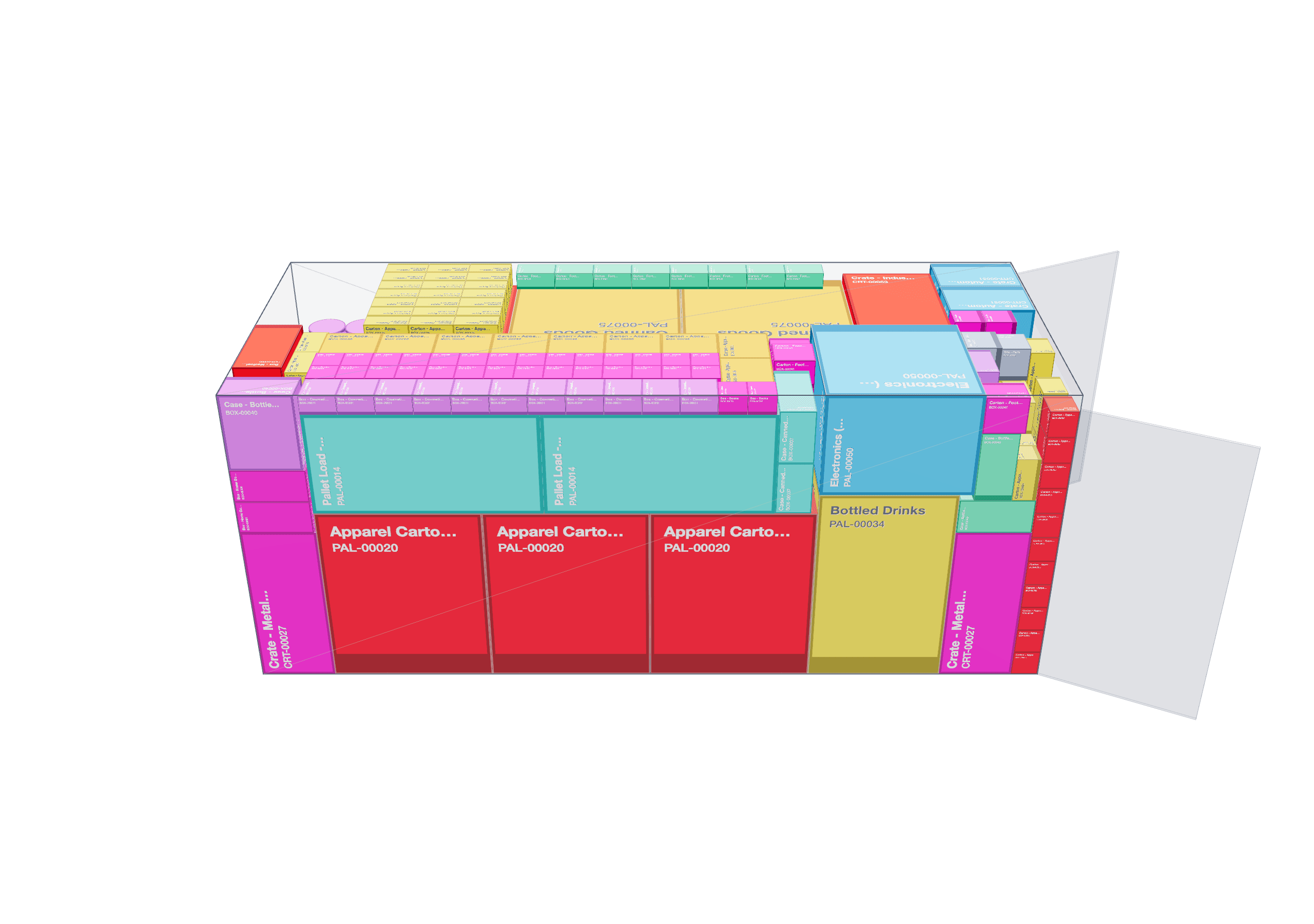
Plan Container & Truck Loads in 3D — Fast.
Optimize stuffing plans, cut freight costs, and remove guesswork with an interactive 3D load planner.
3D Load Visualization
Interactive container planning
Powerful Features for Load Planning
Everything you need to optimize container and truck loading with precision and speed.
Smart Packing Algorithm
Advanced placement optimization to maximize space utilization and minimize cargo shifts during transport.
3D Visualization
See placement, layers, and gaps in real time with interactive 3D container views.
Project Management
Save, load, and manage multiple projects. Auto-cleanup keeps your workspace organized.
20+ Container Types
Sea transport (20ft, 40ft, 40HC, 45HC) and road transport (3.5T to Mega Truck) with realistic dimensions.
Advanced Excel Export
Technical reports with placement plans, item details, and algorithm build sequences (solver steps) for single containers or full fleets.
Fleet Planning
Plan multiple containers simultaneously. Compare different configurations to find the most cost-effective solution.
Advanced Capabilities for Real Operations
Go beyond basic 3D packing with libraries, axle load checks, CoG analytics and guided loading workflows.
Reusable Item Library
Save your most-used boxes, pallets and drums with names and dimensions.
Stop re‑typing the same data. Add items from the library and build new load plans in seconds.
Smart Scenario Analysis
Enter your load list, hit the Magic Wand, and let the system test different container and truck options.
End the “which container should I use?” debate. Instantly see the most cost‑effective combinations for sea or road.
Step-by-Step Loading Guide
Extend your PDF export with a clear, sequential loading checklist for warehouse teams.
Not just the result, but the process. “Step 1: place this box on the floor. Step 2: stack this pallet in front.”
Truck Axle Load Estimation
Simulate how much weight sits on the kingpin and rear axle group based on the center of gravity.
Avoid surprise fines. Visual bars show if legal axle limits are exceeded before you load the truck.
3D Center of Gravity View
See the CoG as a red sphere in the 3D scene and its footprint on the floor.
Don’t leave balance to chance. Detect left/right or front/back imbalance and assess rollover risk early.
High-Performance Planning
Optimized for large projects with thousands of items using debouncing, memoization and rendering tweaks.
Thousands of boxes, one smooth experience. Plan complex loads without freezes or lag.
Advanced 3D Loading Modes
Explore your plan in three dedicated modes: Layout (final view), Sorted View (layer-by-layer) and Load Sequence (animation of the packing order).
Answer “why is this box there?” instantly by replaying the algorithm from deep inside the container to the door.
How It Works
Get from cargo list to optimized load plan in four simple steps.
1. Define
Select from 20+ container types and input your cargo dimensions, weights, and quantities.
2. Optimize
Our algorithm analyzes multiple placement combinations to propose an optimized stuffing plan.
3. Save Project
Save your work and manage multiple projects. Access them anytime for future reference.
4. Export PDF & Excel
Generate detailed reports with placement plans, item details, and the algorithm's build sequence for each container.
Built for Logistics Professionals
Designed to meet the needs of various roles in the supply chain industry.
Freight Forwarders
Optimize multi-client consolidations
FTL/LTL Planners
Maximize trailer utilization
Manufacturers
Plan outbound shipments efficiently
E-commerce Operations
Optimize fulfillment shipments
Export Teams
Reduce international shipping costs
Warehouse Managers
Streamline loading operations
Plans for Every Team
Start with a 7-day free trial that unlocks every feature. When it ends, choose the plan that fits your operation.
Free Trial
7 days of full access
- All Pro & Business features unlocked
- Unlimited calculations during trial
- Test on real projects
- Switch to Pro or Business anytime
Pro
Core 3D load planning
- 3D visualization & standard containers
- Manual entry, palletization & project save
- Multi-container & custom container support
- PDF & Excel export, Sorted View
- Advanced AI, axle load, CoG, library & load sequence require Business
Business
All advanced capabilities
- Everything in Pro
- Smart container selection (Auto-Select)
- Axle load estimation & CoG visualization
- Item library, CSV import, step-by-step PDF
- Load sequence animation & advanced 3D modes
Frequently Asked Questions
Yes — you can start a 7-day free trial with full access to all Pro and Business features. During the trial there are no limits. When the trial expires, the workspace is locked until you choose a paid plan, and you can continue either with the Pro plan (core features) or Business plan (all advanced capabilities).
We support 20+ container types including sea transport (20ft, 40ft, 40HC, 45HC, Open Top, Flat Rack, Refrigerated) and road transport (3.5T to Mega Truck, Semi-Trailer, Curtain Side, Flatbed, Double Deck). All with realistic dimensions and payload capacities.
Yes, export detailed reports in both PDF and Excel formats. Excel exports include placement plans, item details, the algorithm's build sequence (solver steps), and fleet summaries. PDF exports also add a human-readable, step-by-step loading guide for warehouse teams.
Absolutely! Save unlimited projects with automatic project summaries showing container count, item count, and fill rates. Access your saved projects anytime and manage them with our built-in project management system.
Yes! Our fleet planning feature allows you to plan multiple containers simultaneously. Compare different configurations side by side to find the most cost-effective solution for your entire shipment.
Excel exports include 5 detailed sheets: Placement Plan (3D coordinates), Item Details (dimensions, weights, positions), Algorithm Steps (solver build sequence; technical list for engineers), Container Summary (utilization stats), and Fleet Overview (multi-container comparison). For warehouse operators, the PDF export adds a separate, plain-language step-by-step loading guide. Available for both single containers and fleet planning.
Your projects are automatically cleaned up after 30 days of inactivity to keep your workspace organized. Active projects (recently accessed or modified) are kept indefinitely. You'll receive notifications before any cleanup occurs.
Get in Touch
Have questions or need custom features? We'd love to hear from you.
Thank you! We'll be in touch soon.